

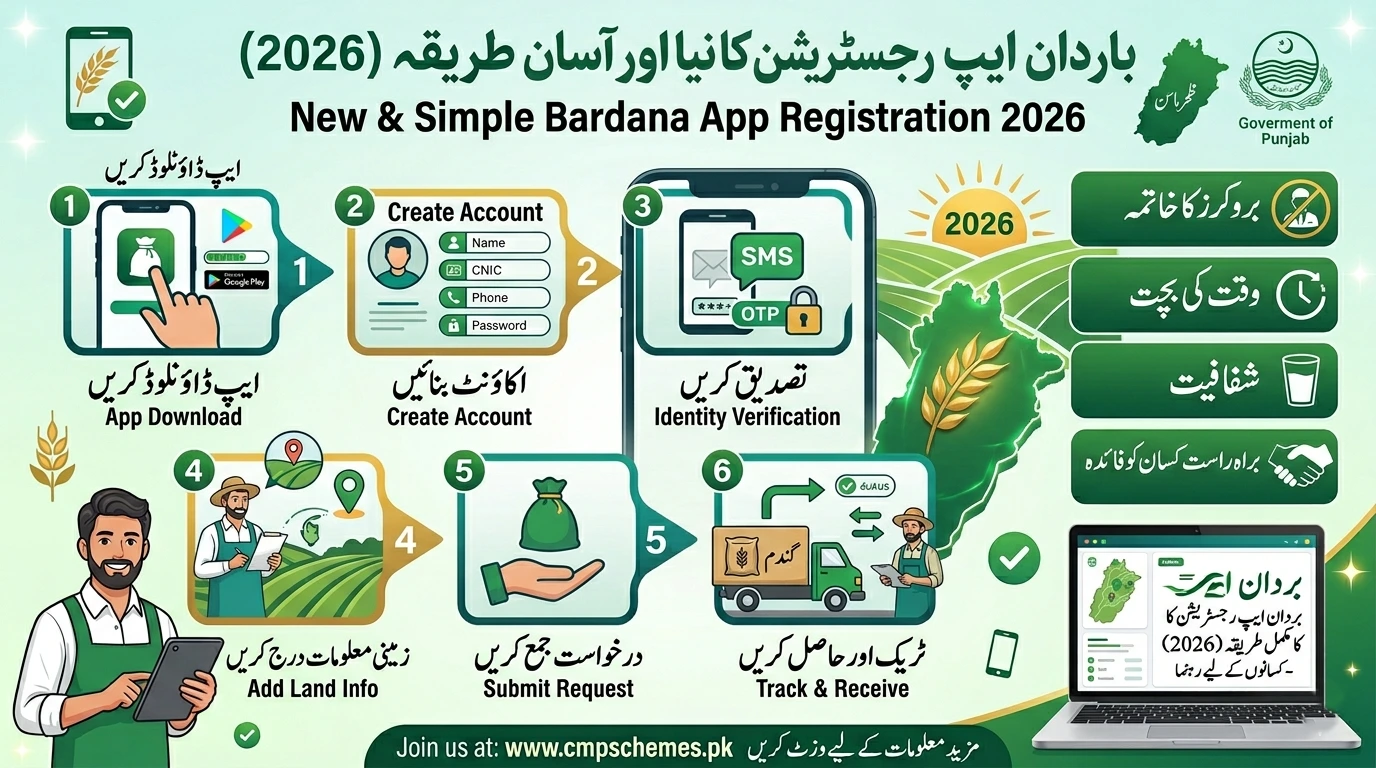
The bardana app registration process has become one of the most important steps for farmers in Punjab as the wheat procurement season 2026 approaches. To make the system fair, transparent, and free from middlemen, the Punjab government has introduced a digital solution that allows farmers to register, apply for bardana (wheat bags), and track their application all from their mobile phones and also read this blog for Punjab Wheat Procurement.
In the past, farmers often had to deal with delays, manual paperwork, and unfair practices. Now, with the Bardana App, everything is simpler and more accessible. Whether you are a small farmer or managing large agricultural land, understanding the bardana app registration process can help you secure your share without hassle.
What is the Bardana App?
The Bardana App is an official digital platform launched by the Government of Punjab to streamline wheat procurement. It connects farmers directly with the system, ensuring transparency and quick processing.
Instead of visiting government offices multiple times, farmers can now:
- Register themselves online
- Submit land and crop details
- Apply for bardana easily
- Track application status in real-time
This shift to a digital system is a big step toward modernizing agriculture in Punjab and supporting farmers more efficiently.
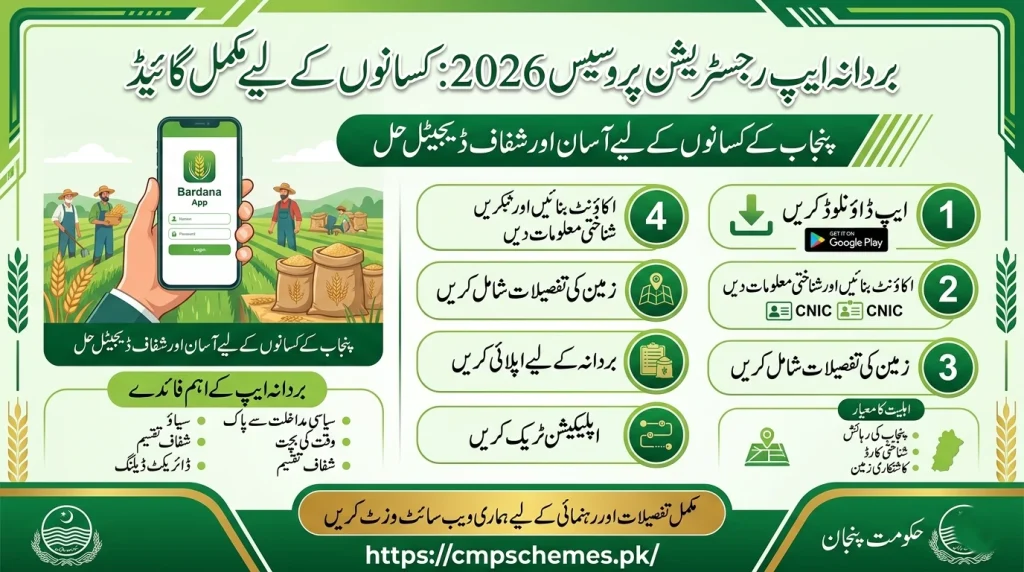
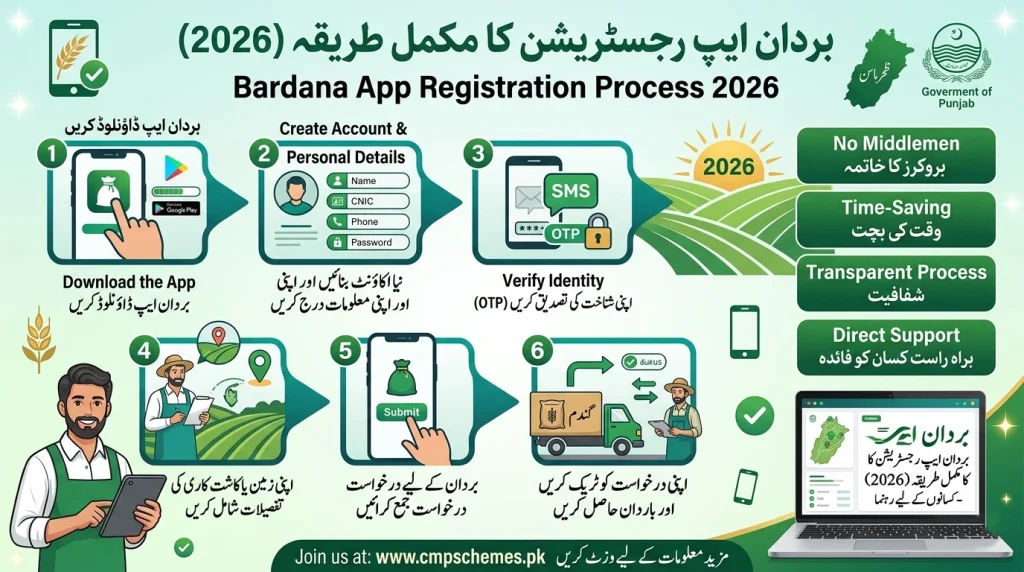
Bardana App Registration Process – Step-by-Step Guide
The bardana app registration process is designed to be simple, even for those who are not very familiar with technology. Follow these steps carefully:
1. Download the App
Start by visiting the Google Play Store and searching for the “Bardana App.” Install the official application on your smartphone.
2. Create Your Account
Open the app and tap on the Sign Up option. This will begin your registration process.
3. Enter Your Personal Details
You will be asked to provide basic information such as:
- Full Name
- CNIC Number
- Mobile Number
- Password
Make sure all details are correct, as incorrect information can cause delays later.
4. Verify Your Identity
Complete the CAPTCHA or verification step to confirm your identity. In some cases, you may also receive an OTP on your mobile number.
5. Add Land Information
This is a crucial part of the bardana app registration process. You need to:
- Select whether you are a landowner or tenant
- Enter details of your cultivated land
- Provide accurate location information
6. Submit Your Registration
Once everything is filled in, click on the Sign Up button. Your registration will be submitted for review.

How to Apply for Bardana After Registration
After completing the bardana app registration process, the next step is applying for bardana. This is just as simple:
- Log in to your account
- Fill out the bardana application form
- Provide details such as:
- Wheat cultivation area
- District and tehsil
- Expected production
Once submitted, your application will be reviewed by the authorities. If approved, you will receive a confirmation through SMS or within the app.
Key Benefits of the Bardana App
The introduction of this system has brought real improvements for farmers. Here’s why the bardana app registration process is worth completing:
- No Middlemen: Farmers deal directly with the system
- Time-Saving: No need to visit offices repeatedly
- Transparency: Fair distribution based on real data
- Quick Updates: Application status available anytime
- Equal Opportunity: Small and large farmers are treated fairly
This digital approach ensures that deserving farmers receive bardana without delays or corruption.

Eligibility Criteria for Registration
Before starting the bardana app registration process, make sure you meet the following requirements:
- You must be a resident of Punjab
- You should have a valid CNIC
- You must own or cultivate agricultural land
- Your mobile number should be active and registered
Both landowners and tenant farmers can apply, making the system inclusive for all.
Common Issues and How to Fix Them
While the system is user-friendly, some farmers may still face minor issues. Here are quick solutions:
- CNIC Error: Double-check your number before submitting
- App Not Opening: Update or reinstall the application
- OTP Not Received: Ensure your SIM is active and has signals
- Login Problem: Use the “Forgot Password” option to reset
If problems continue, it’s best to contact official support rather than relying on third parties.
Important Tips for Farmers
To make the most of the bardana app registration process, keep these practical tips in mind:
- Always enter accurate and verified information
- Keep your CNIC and land documents ready before starting
- Apply as early as possible to avoid last-minute delays
- Regularly check the app for updates and notifications
A little preparation can save you a lot of time and effort.
Why the Bardana App Matters in 2026
The bardana app registration process is not just about applying for wheat bags—it represents a major shift toward digital agriculture in Punjab. By removing manual systems and introducing transparency, the government is helping farmers get the support they truly deserve.
For many farmers, this system means:
- Faster access to resources
- Reduced dependency on agents
- More control over their applications
This is especially important during the wheat season when timely access to bardana can directly impact income.
Conclusion
The bardana app registration process in 2026 is a game-changer for farmers across Punjab. It simplifies registration, ensures fair distribution, and removes unnecessary hurdles that farmers previously faced.
If you are a farmer, completing your registration early can save you from delays and increase your chances of approval. With just a few steps on your mobile phone, you can secure your bardana and focus on what matters most—your crop and your livelihood.
Frequently Asked Questions
What is the Bardana App used for?
It is used to register farmers and distribute wheat bags transparently during the procurement season.
Is the bardana app registration process free?
Yes, the entire registration process is completely free for farmers.
Can tenant farmers apply?
Yes, tenant farmers can register by selecting the appropriate option while entering land details.
How will I know if my application is approved?
You will receive a confirmation via SMS or notification inside the app.
What documents are required?
You need a valid CNIC, active mobile number, and accurate land or cultivation details.
